Enjoying GT Micro Racers?
Join our community to rate games and chat with other players!Description
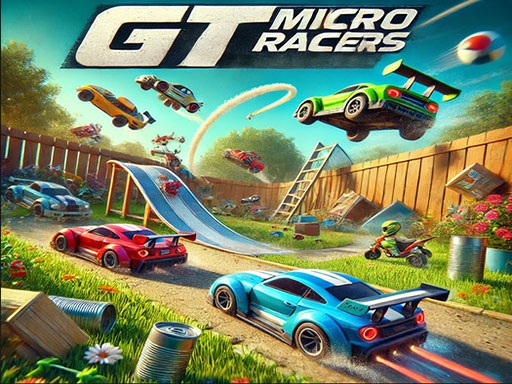
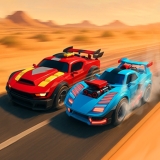
Get ready for the ultimate racing adventure with **GT Micro Racers**! This game takes high-speed racing to a whole new tiny scale! Hop into your super cool GT-style mini car and zoom through exciting outdoor tracks built from everyday household objects.
Race across giant books, zoom around soda cans, and fly off wooden ramps in a sunny backyard full of grass, flowers, and fun surprises. Show off your driving skills by drifting around sharp turns, launching off crazy jumps, and speeding past your rivals to win the race!
With easy controls and thrilling action, **GT Micro Racers** is perfect for kids who love fast cars and big fun. Jump in, hit the gas, and become the ultimate micro racing champion today! 🏎️💨
Race across giant books, zoom around soda cans, and fly off wooden ramps in a sunny backyard full of grass, flowers, and fun surprises. Show off your driving skills by drifting around sharp turns, launching off crazy jumps, and speeding past your rivals to win the race!
With easy controls and thrilling action, **GT Micro Racers** is perfect for kids who love fast cars and big fun. Jump in, hit the gas, and become the ultimate micro racing champion today! 🏎️💨
How to Play
**How to Move Your Character Using Arrow Keys**
Hey there, little gamers! 🎮 Are you ready to control your favorite game characters like a pro? It’s super easy—all you need are the **arrow keys** on your keyboard! Let’s learn how to move around in games and have tons of fun!
### **What Are Arrow Keys?**
Look at your keyboard. Do you see four keys with tiny arrows pointing up, down, left, and right? Those are your **arrow keys**! They help you move your character in games. Here’s what each one does:
- **⬆️ Up Arrow**: Move your character **forward** or **jump**!
- **⬇️ Down Arrow**: Move **backward** or **crouch down**.
- **⬅️ Left Arrow**: Turn or move to the **left side**.
- **➡️ Right Arrow**: Turn or move to the **right side**.
### **How to Use Arrow Keys in Games**
1. **Start the Game**: Open your favorite game on RosGames and press **Play**.
2. **Find Your Character**: Look for your hero, car, or animal on the screen.
3. **Press the Arrow Keys**:
- Want to go **up**? Press the **⬆️** key!
- Need to dodge something? Press **⬅️** or **➡️** to move sideways!
- Want to slide under a barrier? Press **⬇️** to crouch!
4. **Practice Makes Perfect**: The more you play, the faster you’ll get!
### **Fun Tips for Little Gamers**
- **Take Your Time**: Don’t rush—explore the game world!
- **Watch Out for Obstacles**: Use arrow keys to jump over or avoid them.
- **Try Different Games**: Some games use arrow keys to drive cars, fly planes, or even control robots!
### **Ready to Play?**
Now that you know how to use arrow keys, it’s time to jump into action! Check out these awesome games on RosGames and start moving:
- **[Super Adventure Run](#)** – Run, jump, and collect coins!
- **[Dino Dash](#)** – Help the dino escape by dodging obstacles!
- **[Space Explorer](#)** – Fly your rocket ship using arrow keys!
Remember, practice makes you a gaming champion! 🏆 Have fun, and don’t forget to share your high scores with friends!
**Happy Gaming! 🚀**
Hey there, little gamers! 🎮 Are you ready to control your favorite game characters like a pro? It’s super easy—all you need are the **arrow keys** on your keyboard! Let’s learn how to move around in games and have tons of fun!
### **What Are Arrow Keys?**
Look at your keyboard. Do you see four keys with tiny arrows pointing up, down, left, and right? Those are your **arrow keys**! They help you move your character in games. Here’s what each one does:
- **⬆️ Up Arrow**: Move your character **forward** or **jump**!
- **⬇️ Down Arrow**: Move **backward** or **crouch down**.
- **⬅️ Left Arrow**: Turn or move to the **left side**.
- **➡️ Right Arrow**: Turn or move to the **right side**.
### **How to Use Arrow Keys in Games**
1. **Start the Game**: Open your favorite game on RosGames and press **Play**.
2. **Find Your Character**: Look for your hero, car, or animal on the screen.
3. **Press the Arrow Keys**:
- Want to go **up**? Press the **⬆️** key!
- Need to dodge something? Press **⬅️** or **➡️** to move sideways!
- Want to slide under a barrier? Press **⬇️** to crouch!
4. **Practice Makes Perfect**: The more you play, the faster you’ll get!
### **Fun Tips for Little Gamers**
- **Take Your Time**: Don’t rush—explore the game world!
- **Watch Out for Obstacles**: Use arrow keys to jump over or avoid them.
- **Try Different Games**: Some games use arrow keys to drive cars, fly planes, or even control robots!
### **Ready to Play?**
Now that you know how to use arrow keys, it’s time to jump into action! Check out these awesome games on RosGames and start moving:
- **[Super Adventure Run](#)** – Run, jump, and collect coins!
- **[Dino Dash](#)** – Help the dino escape by dodging obstacles!
- **[Space Explorer](#)** – Fly your rocket ship using arrow keys!
Remember, practice makes you a gaming champion! 🏆 Have fun, and don’t forget to share your high scores with friends!
**Happy Gaming! 🚀**
Tips
- Master the ideal drift angles to sustain high speeds through turns in GT Micro Racers.
- Enhance your vehicle's handling and traction to navigate through gusty roads.
- Reserve your nitro for stretches where you can exploit it fully for speed gains.
FAQ
- Q What are the techniques for handling and drifting in GT Micro Racers on RosGames?
-
A In GT Micro Racers on RosGames, you can control your vehicle with arrow keys or WASD. To drift, gently release the gas or press the spacebar while navigating tight turns, keeping your speed consistent.
- Q Are there car upgrades available in GT Micro Racers on RosGames?
-
A Yes, in GT Micro Racers on RosGames, you can earn credits by winning races. These credits can be used to enhance your vehicle's engine, tires, nitro boost, and to personalize your car's paint and wheels.


Comments