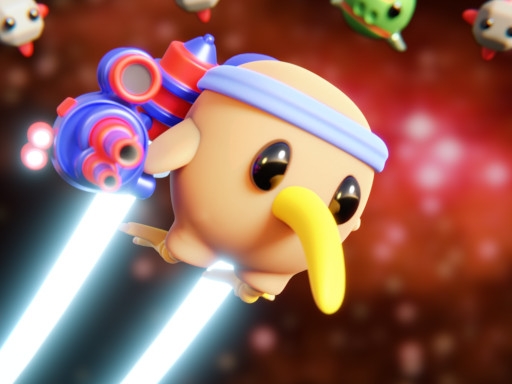
Enjoying Jetpack Kiwi Lite?
Join our community to rate games and chat with other players!Description
Get ready for an exciting adventure with Jetpack Kiwi Lite! This awesome 2D side-scrolling shoot 'em up game is packed with action. You'll face 4 thrilling levels, 1 epic boss battle, and tons of enemy spaceships! Choose your favorite character, each with a unique special attack, and blast through the cosmos! Play solo or team up with a friend in local co-op mode for double the fun. Can you save the galaxy? Let's find out!
How to Play
Game Controls:
WASD or ARROW KEYS = Move your jetpack kiwi
X = Shoot laser beams
B = Drop a bomb
M = Mute/unmute sound
P = Pause the game
Gamepad:
D-pad or Left Analog Stick = Move
X = Shoot
B = Bomb
Start = Pause
Ready to take off? Have a blast!
WASD or ARROW KEYS = Move your jetpack kiwi
X = Shoot laser beams
B = Drop a bomb
M = Mute/unmute sound
P = Pause the game
Gamepad:
D-pad or Left Analog Stick = Move
X = Shoot
B = Bomb
Start = Pause
Ready to take off? Have a blast!
Tips
- Reload your firearm while concealed to prevent being vulnerable.
- Position your crosshair at the head level to land crucial headshots in Jetpack Kiwi Lite.
- Be attentive to the sound of footsteps to predict enemy movements and positions.
FAQ
- Q What are the fundamental controls in Jetpack Kiwi Lite on RosGames?
-
A On RosGames, Jetpack Kiwi Lite uses WASD or arrow keys for movement and the mouse cursor for aiming and shooting. Number keys are used to switch weapons, and the R key reloads your magazine when it's empty.
- Q How can I enhance my shooting precision in Jetpack Kiwi Lite on RosGames?
-
A To improve your aim in Jetpack Kiwi Lite on RosGames, aim for head-level crosshairs and stand still for a brief moment while shooting to minimize recoil. Upgrade your weaponry and train in the practice modes to master the shooting techniques.



Comments