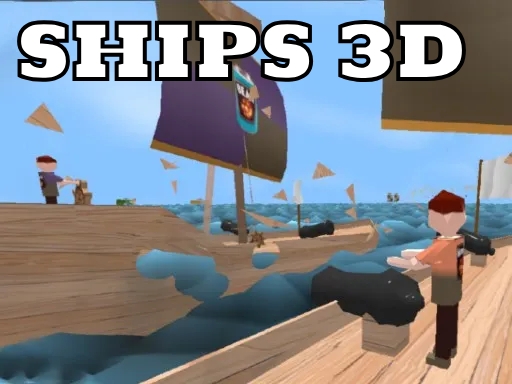
Enjoying Ships 3D IO?
Join our community to rate games and chat with other players!Description
Ahoy, young captain! Ships 3D IO is an exciting multiplayer sailing game where you become the captain of your own ship! Explore the open seas, steer your ship, and fire cannons to sink enemy ships. Interact with the helm, sails, and cannons to control your adventure. Score points by defeating other players and becoming the mightiest pirate on the waves! Are you ready to set sail and conquer the ocean?
How to Play
- Use W A S D to move around your ship
- Move your mouse to look around
- Click to shoot cannons or swing your sword
- Press F to interact with cannons, steering, and sails, pick up items, or drop them. If you fall into the water, wait 5 seconds to respawn!
- Press E to switch your weapon
- Press 1 or 2 to change weapons quickly
- Move your mouse to look around
- Click to shoot cannons or swing your sword
- Press F to interact with cannons, steering, and sails, pick up items, or drop them. If you fall into the water, wait 5 seconds to respawn!
- Press E to switch your weapon
- Press 1 or 2 to change weapons quickly
Tips
- Reload your firearm while concealed to prevent being vulnerable.
- Be attentive to the sound of footsteps to predict enemy movements and positions.
- Position your crosshair at the head level to land crucial headshots in Ships 3D IO.
FAQ
- Q What are the fundamental controls in Ships 3D IO on RosGames?
-
A On RosGames, Ships 3D IO uses WASD or arrow keys for movement and the mouse cursor for aiming and shooting. Number keys are used to switch weapons, and the R key reloads your magazine when it's empty.
- Q How can I enhance my shooting precision in Ships 3D IO on RosGames?
-
A To improve your aim in Ships 3D IO on RosGames, aim for head-level crosshairs and stand still for a brief moment while shooting to minimize recoil. Upgrade your weaponry and train in the practice modes to master the shooting techniques.





Comments